Aggregated data
Breaks down the sidebar selection (dataset, contaminants, dates and filters) over the whole date range. Choose what goes on the rows (x axis) and, optionally, the columns (colors).
Summary table
Every public water system in EPA's inventory (SDWA_PUB_WATER_SYSTEMS), whether or not it had a violation, with its characteristics and reported treatment. The sidebar's water system filters apply here. "In sidebar selection" means the system has records in the sidebar's dataset, contaminants, dates and record filters, which links this inventory to the violation or occurrence data.
Where the systems are
The inventory has no coordinates: each system is placed at the center of a county it serves (from EPA's areas-served records) or, failing that, at the center of its mailing ZIP code, which can be the owner's office rather than the water system. Up to 2,000 systems, largest first; use the PWSID filter (for example the Arsenic Demo Sites preset) to map specific systems. Click a dot for the system's full details.
Water systems
System list
The combined CSV has one row per filtered system: characteristics, treatment summary (facilities, objectives, processes) and its number of records in the sidebar selection. The treatment CSV lists every treatment process at every facility of the filtered systems. Select a system below to see its details.
Compares the selected statistic before and after an intervention date (for example, a rule's compliance date, such as 2006-01-23 when the 10 µg/L arsenic MCL took effect) using the data selection in the sidebar. Each observation is one group × period value; the groups are the sidebar's Group by setting.
How to run this analysis
- In the sidebar, choose the dataset and contaminant(s), a date range with several periods before and after the intervention, the time level (year, quarter or month), the statistic, and Group by: National is fine for pre/post and interrupted time series; difference-in-differences needs groups (for example State or System size). To study specific systems, add them to the PWSID filter (or use the Arsenic Demo Sites preset). Press Update results.
- Intervention date: when the change took effect, for example 2006-01-23 (the arsenic MCL compliance date).
- Analyze: Measured values (choose each system's value per period: mean by default, median, 95th percentile, maximum or minimum; these are averaged across systems) or the number of water systems in violation or with a detection.
- Analysis: Change over time (the pre/post or difference-in-differences designs below), Time to first event (survival analysis), or Both on one page with the same date, data and control systems. Survival analysis: how long until each water system's first violation of the selected contaminants (or, for Six Year Review and UCMR data, its first result above a threshold), counted from the intervention date, which becomes the start of follow-up, to the sidebar's end date. Compare groups (system size, source water, owner type, state…) or the treatment and control systems; results are Kaplan–Meier curves, median time, the share still event-free at 1, 5 and 10 years, a log-rank test and Cox hazard ratios.
- Design: Pre/post comparison (also fits an interrupted time series, whose projected pre-intervention trend is the counterfactual) or Difference-in-differences with a control group: specific water systems (paste PWSIDs or choose control-only filters such as state or system size; the treatment group is the sidebar selection) or other groups under the sidebar's Group by.
- Optional: the confidence level and whether to leave out the period that contains the date.
- Press Run analysis. Read the key findings, charts and tables; download the results or analysis data as CSV, or add them to a report in the Report tab. The interrupted time series needs at least three periods on each side.
Every other group in the filtered data forms the control group. Choose a Group by other than National, for example State to compare states that adopted a rule with states that did not, or System size to compare systems a rule applied to with those it did not.
Treatment group: the water systems in the sidebar selection (for example the PWSID filter or the Arsenic Demo Sites preset). Control group: water systems you list below and/or that match the filters below (instead of the sidebar's system filters); the same contaminants, dates and record filters apply. Each water system is one unit, and systems in both groups are left out of the control group.
Without a control group (pre/post design), the interrupted time series projects the pre-intervention trend forward as the counterfactual.
Survival results
Reading these results
- Each curve is the share of water systems that have not yet had the event, by years since the start date (Kaplan–Meier). Systems are followed until their first event; systems without one are censored at the end of the follow-up (or when they closed, or at their last sample).
- The log-rank test asks whether the curves differ. The hazard ratio (Cox proportional hazards) compares each group's event rate with the reference group's: above 1 means events come sooner, below 1 later. It assumes the ratio is roughly constant over time; curves that cross suggest it is not.
- Violation data record reported violations, which depend on monitoring and reporting. Occurrence data follow only systems that were sampled, and a threshold exceedance is one sample, not a compliance violation.
The water systems chosen in the PWSID filter, placed at a county they serve or their mailing ZIP code (approximate). Click a dot to open the system's details in the Water systems tab.
Results tables
Reading these results
- Pre/post tests treat each group-period value as independent. Values from the same group over time are usually correlated, so these p-values can be too small. The time series and DiD models use robust standard errors.
- A pre/post change does not prove the intervention caused it. DiD adds a control group and assumes both groups would have followed parallel trends without the intervention; check the pre-trend test.
- Violation counts reflect reported violations, which also change with monitoring and reporting practices.
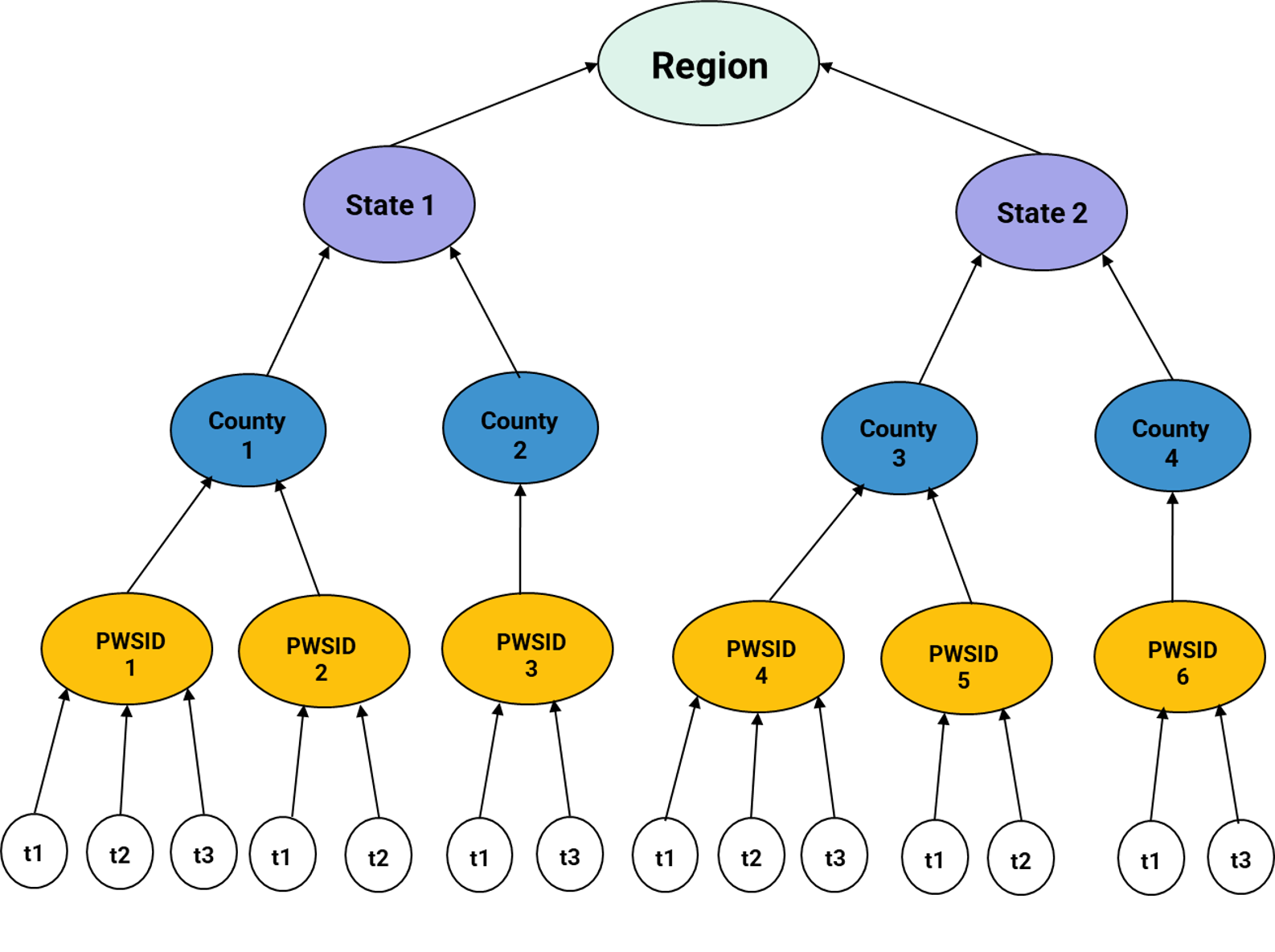
Drinking water data are nested: repeated samples come from the same water system, systems sit in counties, counties in states and states in EPA regions. Results from the same system (or county, or state) tend to be alike, so treating every sample as independent, as regular regression does, overstates how certain the results are and can mix up effects within and between places. A multilevel model (mixed model with random intercepts) gives each level its own variation.
The ICC (intraclass correlation) says how much of the variation lies between systems, counties or states. The tool fits regular regression, then adds each grouping level in turn and then your predictors, and compares them by AIC, BIC and likelihood-ratio tests, so you can see which levels the data need and what the predictors explain at each level.
How to run this analysis
- Data: This tool's data uses every result for the one contaminant chosen in the sidebar (Six Year Review or UCMR results are best; with violation data only violating systems' measurements are included), with the sidebar's dates, filters and non-detect rule. Or upload your own table with the outcome, grouping columns and predictors (template).
- Outcome: concentrations are usually skewed, so log10 is the default (values at or below zero are left out).
- Grouping levels, from lowest to highest, for example water system, county, state. With your own table, pick any of its columns for each level; the check under the menus counts the groups and says whether they nest.
- Predictors: system characteristics (source water, size, owner, type), season and year; for your own table, any columns, in the order to add them. Centering: grand mean estimates each predictor's general effect; within cluster splits a measured predictor into its group's mean and each result's difference from it (the within-group effect).
- Adding predictors: one at a time in your order, or forward selection by BIC or AIC (each step adds the predictor that lowers it most and stops when none does; the model with every predictor is shown for comparison).
- Press Fit models.
The model, the steps and what to check
The tool follows the usual multilevel modeling steps: 0. decide on centering; 1. fit the null model (no predictors) and read the ICC to see whether the grouping matters; 2. fit intermediate models, adding one predictor at a time; 3. pick the final model by AIC, BIC and likelihood-ratio tests; 4. interpret the estimates. Shown for three levels (results i in water systems j in counties k in states l); fewer or other levels work the same way.
- γ0
- overall mean (intercept); fixed
- βp
- effect of predictor xp; fixed, the same in every group
- w, v, u
- random intercepts: how far a state, a county within its state and a system within its county sit from the level above
- e
- residual (measurement and unexplained error)
- τ², σ²
- variance between groups at each level; residual variance
- σf²
- variance of the fixed part (the predictions from the predictors)
- L, k, n
- likelihood, number of parameters, number of results
- Rp²
- R² of predictor p regressed on the other predictors
| Statistic | Want |
|---|---|
| ICC | Above 0.1: the level matters; consider a multilevel model |
| LRT | p < 0.05 (a larger χ²): the added term improves the fit |
| AIC / BIC | Lowest is the best model (BIC penalizes extra terms more) |
| R² (marginal, conditional) | Higher |
| RMSE | Lower |
| p-value | Below 0.05 for an effect to count as significant |
| VIF | Close to 1; above 5 moderate and above 10 severe multicollinearity |
| Residuals | Even scatter around 0 and close to the Q-Q line |
Fitted by maximum likelihood (like lme(..., method = "ML") in R's nlme or lmer(..., REML = FALSE) in lme4), so models with different predictors can be compared. Random intercepts only: random slopes and cross-level interactions are not fitted here.
As in Black, Luangphairin & Alfredo (2025, doi:10.1007/s10661-025-13689-0): each county's population-weighted value (their Eqs. 5–6), counties within states, with the county's sociodemographic percentages as predictors and BIC to choose them. Water system instead models each system's value within its county within its state (a system serving several counties counts in each). Zeros cannot be logged: for counts with many zeros, untick log10.
Things to check
Fitted model
Step 1. Null model: variance components and ICC
Each bar splits the variance of the null model (no predictors) by level; the second bar shows what is left once the predictors are added. Within (residual): variation among results from the same lowest-level group.
Steps 1–3. Model comparison
Lower AIC and BIC are better (a difference above about 10 is strong). Likelihood-ratio tests compare each model with the one above it; for an added grouping level the p-value is halved because a variance cannot be negative. Fitted by maximum likelihood, so models with different predictors can be compared.
Fixed effects
Reading these results
- A large ICC at a level means results in the same group are alike; ignoring that level makes standard errors too small (compare the two SE columns).
- Coefficients are on the outcome's scale; with log10, a coefficient b means results are 10b times as high (for example 0.3 is about twice as high).
- Each categorical predictor is compared with its most common category (the reference). The random intercepts allow each group its own average but the same predictor effects everywhere.
- Associations, not proof of cause; results come from a random sample of water systems (the seed is fixed, so they repeat).
Residuals (result minus the model's fitted value, including the group effects) should scatter evenly around 0; a funnel shape means unequal variance (try the log10 outcome).
Points close to the line mean roughly normal residuals; curves at the ends mean heavy tails or skew.
Finds which measured parameters best predict an outcome in your own data, for example whether routine river data (level, rainfall, pH, alkalinity, hardness, TOC, conductance) and the share of water blended in from an ASR well can predict the PFAS coming into a surface water plant. PFAS samples are expensive; a good model lets a plant anticipate high influent PFAS and adjust treatment to meet its effluent standard, with PFAS sampling kept to check the model. Three tree models are fitted and compared on data held back from training: a decision tree (one readable set of yes/no splits), a random forest (many trees on resampled data, averaged) and gradient boosting in the XGBoost style (trees added one at a time to correct the previous ones). Everything runs in your browser; your file is not uploaded anywhere.
How to run this analysis
- Your data: a CSV with one row per sample or day and one column per parameter, including the outcome (for example
influent_pfas_ngL) and a date if you have one. Download the template. - Outcome: the column to predict, either as a value or as above a threshold (yes/no, for example above 4 ng/L).
- Predictors: the columns that might explain it (all others by default). Text columns such as a site name become one yes/no column per category. With a date, month and year can be added as predictors.
- Test rows: 25% of rows are held back to check the models on data they have not seen: the latest 25% by date (best for time series) or a random 25%.
- Press Run models. Read the comparison, which predictors matter (permutation importance), the decision tree, predicted vs observed and how the outcome changes with the top predictors.
Model settings
Model comparison
The decision tree
Read from the top: each box asks whether a predictor is at or below a value (yes to the left, no to the right) and shows the average outcome of the rows that reach it. Shaded boxes are the final groups, darker for higher predicted values.
How the best model's prediction changes as one predictor moves over its range, with the others as observed (partial dependence).
Downloads
Reading these results
- Importance shows which predictors the models use to predict the outcome in this data; it is association, not proof that a predictor causes the change. Parameters that move together (for example rainfall and turbidity) share importance.
- Judge models on the held-out rows. A model much better on training rows than held-out rows is overfitting: use a shallower tree, larger leaves or more data.
- With fewer than about 100 rows, results are unstable; try another random seed and see whether the top predictors stay the same. Predictions outside the range of the data are not reliable.
Tests whether parameters rise and fall together, and how strongly. Choose two parameters for a scatter plot, or up to eight for a correlation matrix. Use the tool's data (the dataset, dates and filters in the sidebar) or a table of your own.
How to run this analysis
- Data: This tool's data uses the sidebar selection (dataset, dates, filters and the statistic, for example violation counts or mean concentration), so set those first; or choose My own table and load a CSV or tab-delimited file with a header row.
- For the tool's data, choose what each observation is: a water system, state, EPA region or period.
- Pick 2 to 8 parameters: contaminants (and population served, for water systems), or the numeric columns of your table.
- Choose the method: Spearman (default; best for skewed data and outliers), Pearson (straight-line relationships) or Kendall; and the confidence level.
- Press Run correlation. Two parameters give a scatter plot (tick log scale for skewed values); more give a correlation matrix. The statistics table and summary sentences follow; download them as CSV.
Any table with a header row works: each row is one observation and each numeric column can be a parameter. No column naming is needed. The file is read in your browser and is not uploaded anywhere.
Download a template (made-up example values to replace): CSV or tab-delimited, a header row, one row per sample or site, one column per parameter. Text such as <1 or ND counts as missing; a column is offered when at least half its values are numbers.
Statistics
Spearman and Kendall use ranks, so they suit skewed concentrations and outliers and detect any steady (monotonic) relationship; Pearson measures a straight-line relationship and is sensitive to outliers. Strength: |coefficient| below 0.1 negligible, 0.1–0.3 weak, 0.3–0.5 moderate, 0.5–0.7 strong, 0.7 and above very strong. With several pairs, the Holm-adjusted p-value controls for testing many pairs at once. A correlation does not show that one parameter causes the other.
 Visit the Alfredo DW-TAPS Research Group for more research →
Why a relative health indicator?
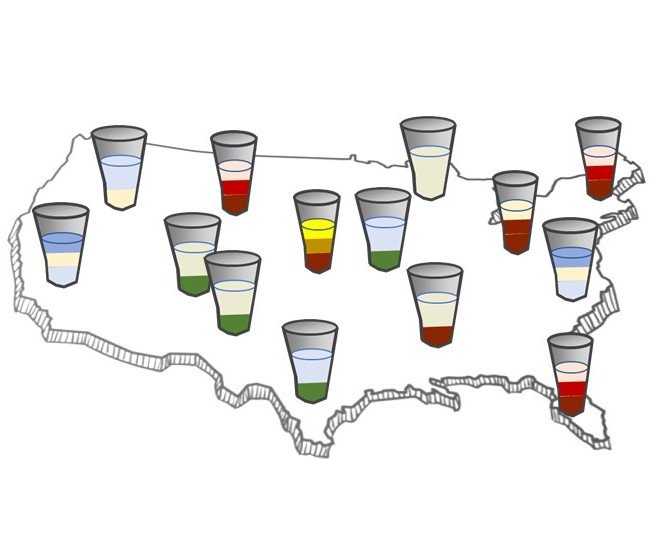
Despite federal initiatives such as the Infrastructure Bill to address sub-par drinking water across the U.S., there is still no consistent metric to compare the cumulative relative health risk of drinking a glass of water in one location with that in another. Regulators have long tracked drinking water systems by the number of violations of individual contaminants, which ignores the overall health burden from concurrent exposure to several chemicals.
The Relative Health Index (RHI) is a cumulative risk metric that combines cancer and non-cancer toxicity values, exposure concentrations and severity scores, so the "cup of water" from any system can be compared with another. This research applies it to over 30,000 community water systems in the United States, covering contaminant violations from 1982 to 2023 and more than a decade of RHI calculations from contaminant occurrence. This tab lets you calculate it for any selection, or for your own results.
References
Alfredo, K. A., Seidel, C., Ghosh, A., & Roberson, J. A. (2017). Using a relative health indicator (RHI) metric to estimate health risk reductions in drinking water. Environmental Monitoring and Assessment, 189, 124. https://doi.org/10.1007/s10661-017-5815-8
Black, A., Luangphairin, N., & Alfredo, K. (2025). The impact of the fourth regulatory determination on vulnerable populations. Environmental Monitoring and Assessment, 197, 323. https://doi.org/10.1007/s10661-025-13689-0
The relative health indicator (RHI) puts drinking water contaminants on one scale of relative health impact, combining toxicity (reference dose and cancer slope factor), the severity of the health effect and exposure, so different contaminants and "cups of water" can be compared. Methods: Alfredo, Seidel, Ghosh & Roberson (2017); applied with sociodemographic (CDC/ATSDR Social Vulnerability Index) analysis in Black, Luangphairin & Alfredo (2025). RHI is a relative indicator for comparison, not an estimate of cases of disease.
How to run this analysis
- Data: This tool's data uses the sidebar's dataset, dates and filters. A Six Year Review or UCMR dataset gives exposure for every system sampled; SDWIS violations give it only for systems with violations. Or choose My own results, load your file and match the columns (system or site, contaminant, concentration, unit, and optionally population and subregion).
- Exposure per water system: the 95th percentile of results (as in Alfredo et al. 2017), the mean or the maximum; and how to value non-detects (¼ of the reporting limit by default).
- Contaminants: choose any contaminant in the selected dataset. Arsenic, uranium, nitrate and combined radium come with published RHI values; choosing another adds a row to RHI parameters below, where you enter its RfD, UF, severity and/or cancer slope factor before calculating. Clear empties the choice (for example after the demo).
- Subregion: how systems are grouped for the population-weighted results (state, EPA region, system size, source water or type).
- Press Calculate RHI (below the RHI parameters). Results: key findings, the RHI of a glass of water at each threshold, population-RHI, cups of water, the distribution across systems, and tables by contaminant, subregion and system (each downloadable as CSV).
Caution: RHI is a relative index. An RHI value has no meaning on its own: it is not a risk, a probability or a number of cases of disease. Use it only to compare contaminants, water systems or places calculated with the same assumptions and toxicity parameters; changing a reference dose, slope factor or severity changes every value.
One row per sample or per system: a contaminant (SDWIS code such as 1005, or a name such as Arsenic), a concentration and its unit; optionally a system or site ID, the population served and a subregion. Choose the matching columns below after loading. The file is read in your browser and is not uploaded anywhere.
Download a template (made-up example values to replace): one row per sample (or per system); contaminant as an SDWIS code (1005) or the name in the RHI parameters table (Arsenic, Nitrate (as N), Uranium (combined), Radium (combined 226 and 228)); unit as mg/L, ug/L (µg/L, ppb), ng/L or pCi/L; several samples per system are combined by the exposure choice above (95th percentile by default).
Check or complete the RHI parameters below (Look up values fills a row's RfD and cancer slope factor from EPA's CompTox Chemicals Dashboard, with citations), then press Calculate RHI at the bottom.
RHI parameters
- j
- non-cancer or cancer
- exposure
- concentration in the water (mg/L, or pCi/L for radionuclides)
- I
- water ingested per day (default 2 L/day)
- BW
- body weight (default 70 kg)
- incidence
- non-cancer incidence (default 0.01)
- RfD
- oral reference dose (mg/kg-day)
- UF
- uncertainty factor of the RfD
- CSF
- oral cancer slope factor (per mg/kg-day)
- severity
- WHO disability weight of the critical effect (cancer: 0.29)
Each contaminant needs an RfD with its UF and severity, and/or a cancer slope factor (CSF); the threshold is optional (used for "RHI at the threshold"). Your changes are saved in this browser.
- Find a contaminant: type part of its name, its SDWIS code or its CAS number (not case sensitive) and pick a suggestion, e.g. arsenic, 1005 or 7440-38-2.
- Press Add and look up. The code, name, exposure unit and EPA threshold (MCL) fill in, and a panel lists the values available for it.
- In the panel, press Use on the oral RfD and/or cancer slope factor you want; each comes from EPA's CompTox Chemicals Dashboard (IRIS, PPRTV, ATSDR and other assessments) with its source and year, and its citation goes into the report. For arsenic, uranium, nitrate and radium, Use all applies the published set from Alfredo et al. (2017).
- Fill in what is left: the UF from the assessment (linked in the panel) and the severity (Use 0.01 for the default WHO weight, or your own).
- When the row's status reads ready, choose the contaminant above and press Calculate RHI. You can also type or change any value by hand.
Toxicity value sources
RHI of a glass of water at each contaminant's threshold (the MCL unless changed), the comparison in Alfredo et al. (2017) Fig. 3.
A cup of water
Cups by state
Each cup's height shows its RHI on a log scale (values span orders of magnitude); the colored layers show each contaminant's share of that cup's RHI. Hover a layer for its value.
Each box spans the 25th to 75th percentile of water systems' total RHI; the line is the median (as in Black et al. 2025, Fig. 1).
By contaminant
By subregion
Population-weighted mean RHI of the water systems in each subregion (Black et al. 2025, Eqs. 5–6); systems without a population served are left out of the weighting. On the state map, hover (or tap) a state to see its cup: layered by contaminant, with each contaminant's RHI and share.
By water system
Which communities are most exposed to a contaminant, and does exposure or relative health risk differ with race, ethnicity or poverty? This tab links each water system to the counties or ZIP code areas (ZCTAs) it serves, adds sociodemographic data from the Census Bureau or the CDC/ATSDR Social Vulnerability Index, and compares communities, following Black, Luangphairin & Alfredo (2025).
How to run this analysis
- Sociodemographic data (step 1 below): choose the geography (county or ZIP code area; until EPA's areas-served records are in the build, systems are placed by their mailing ZIP code) and a source: paste your free Census API key, choose the ACS year and press Download from the Census Bureau; or load a CDC/ATSDR SVI file (or any table with a FIPS or ZCTA column).
- In the sidebar, choose the dataset, dates, filters and statistic that measure each water system (for example arsenic violation counts, or mean concentration in a Six Year Review dataset). To use relative health risk instead, run the RHI metrics tab first and choose Cumulative RHI as the measure (if it has not been run, a Go to RHI metrics button takes you there).
- Analysis (step 2 below): pick the contaminants, the two groups to compare (a variable and threshold each, for example % minority above 50 and % below 150% of the poverty line above the average), the regression predictors, and whether to adjust for state.
- Press Run analysis. Results: key findings, a map, detection odds ratios, Wilcoxon comparisons with box plots, Spearman correlations with every variable, the regression, and a table of communities (downloadable as CSV).
Counties use the ZIP code of each water system's mailing address from EPA's inventory, placed in the county that contains that ZIP code's center, until the monthly data update adds EPA's records of the counties each system serves. For most systems this is their county; for some it is the county of an owner's or operator's office.
ZIP code areas use the ZIP code of each water system's mailing address from EPA's inventory (99.6% of active systems have one). For most small systems that is where they are, but for some it is an owner's or operator's office. Once the monthly update adds EPA's areas-served records, the ZIP codes systems report serving are used first.
1 · Sociodemographic data
A free key comes by email from api.census.gov/data/key_signup.html. It is sent only to the Census Bureau. Downloaded (about 30 indicators, all selectable): population and age (median age, % under 5, under 18, 65+); race and ethnicity (% Hispanic or Latino and % non-Hispanic White, Black, American Indian and Alaska Native, Asian, Native Hawaiian and Other Pacific Islander, other race, two or more races, and % minority); income and poverty (median household and per capita income, Gini index, % below 100%, 150% and 200% of the poverty line, % of households receiving SNAP); education and work (% without a high school diploma, % with a bachelor's degree, % unemployed); % limited English speaking households; housing (% renters, median home value and rent, % mobile homes, % of households with no vehicle). These are the ACS tables tidycensus and findSVI use in R.
Download a county or ZCTA table from the CDC/ATSDR SVI data page (CSV, United States), or use any table with a FIPS or ZCTA column, for example one made with findSVI::find_svi() or tidycensus::get_acs() in R. Read in your browser only.
Download a template (made-up example values to replace): a FIPS column with 5-digit county codes (or a ZCTA column with 5-digit ZIP code areas), an optional name column, and numeric variables; CDC column names such as RPL_THEMES, EP_POV150 and EP_MINRTY get readable labels, any other numeric column is used as named, and -999 means missing.
No sociodemographic data loaded yet.
2 · Analysis
Map
Detections by community type (odds ratios)
Odds of a detection (or a violation) in a community's water systems for group members compared with others; above 1 means higher odds. Odds ratios are not risk ratios.
Measure by community type (Wilcoxon rank-sum)
Correlation with each variable (Spearman)
Regression
Communities
Builds a report from your latest results in each tab: the Explore chart, the summary table, water systems, the intervention analysis and the correlation. Choose what to include below (everything is included by default). Download it as a standalone HTML file, or print it to PDF.
The logo and organization appear at the top of the report. They are saved in this browser only and never uploaded.
Report style (font, size, colors, paper)
Saved in this browser. The default is the Water Quality Explorer style; changes apply the next time you build the report.
Every code in EPA's SDWA reference table (SDWA_REF_CODE_VALUES): contaminants, rules, violation types, system characteristics and more. Search by code or description. For contaminant, rule and violation codes, the count shows how many violations in this data use the code.
Drinking water standards (MCLs)
EPA's National Primary Drinking Water Regulations: the legal limit for each regulated contaminant (the MCL, maximum contaminant level, or a required TT, treatment technique) and the health-based goal (the MCLG). Limits are in EPA's units; the last column gives the MCL in the unit this tool uses for that contaminant, so you can compare it with measured values. Health effects and common sources are on EPA's page.
Regulation timeline
Every final rule under the Safe Drinking Water Act that set or changed a contaminant standard, from EPA's Regulation Timeline: Contaminants Regulated Under the Safe Drinking Water Act (updated September 2015; download the PDF). Rules since 2015 (the Lead and Copper Rule Revisions and Improvements and the 2024 PFAS rule, which brings the count to 100) are added at the end and marked. Pending changes (the proposed PFAS rescission and perchlorate standard) are in the notes. Click a dot on the chart to jump to that date's rules in the table. Revised contaminants are in italics; numbers in brackets refer to the notes below the table.
Notes
How a standard is made
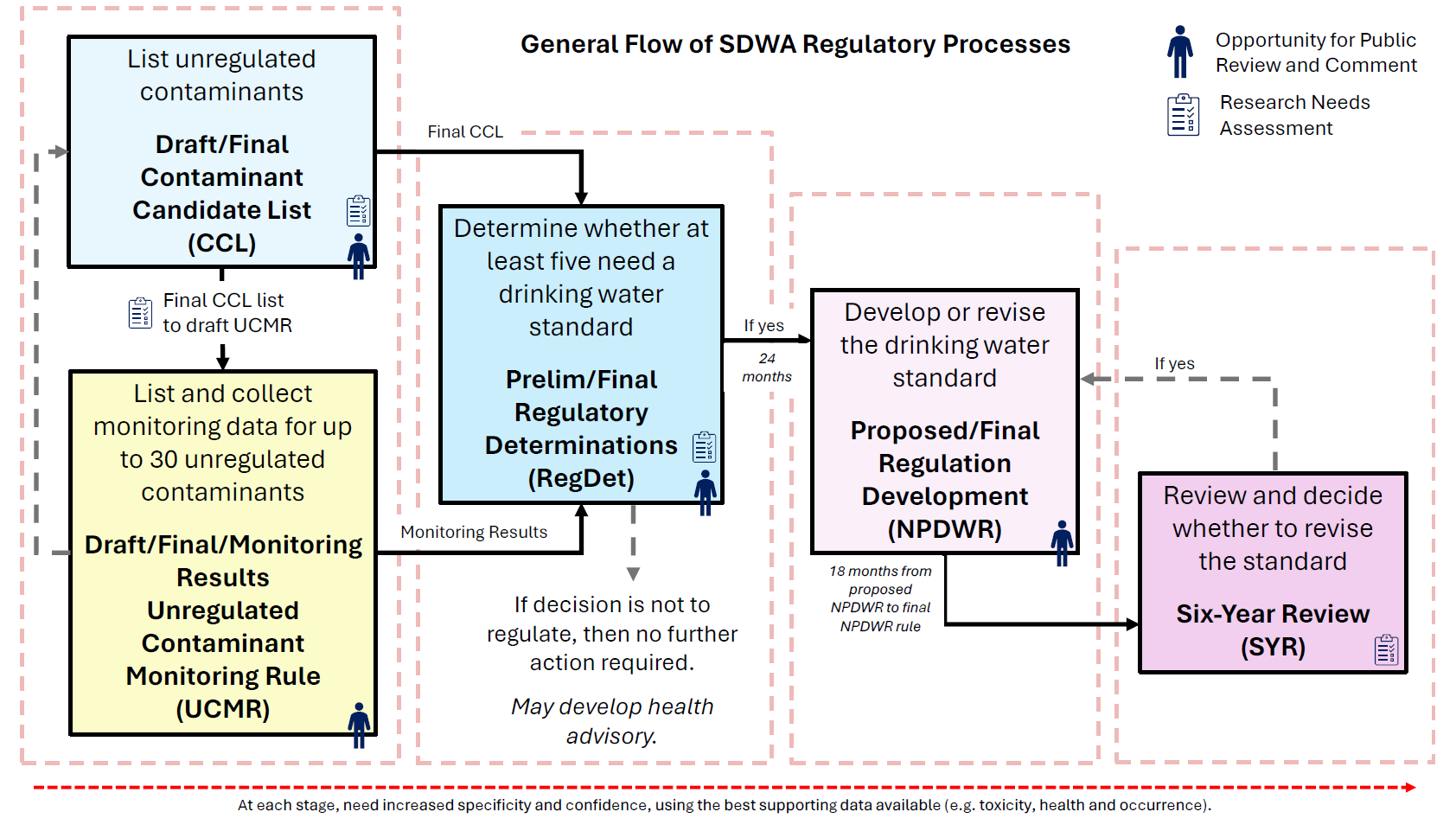
Under the Safe Drinking Water Act, EPA lists unregulated contaminants of concern on the Contaminant Candidate List (CCL), collects nationwide occurrence data for up to 30 of them through the Unregulated Contaminant Monitoring Rule (UCMR), decides whether at least five need a standard (regulatory determinations), develops or revises the standard, and reviews every standard about every six years (Six-Year Review). The UCMR and Six Year Review datasets in this tool come from those steps.
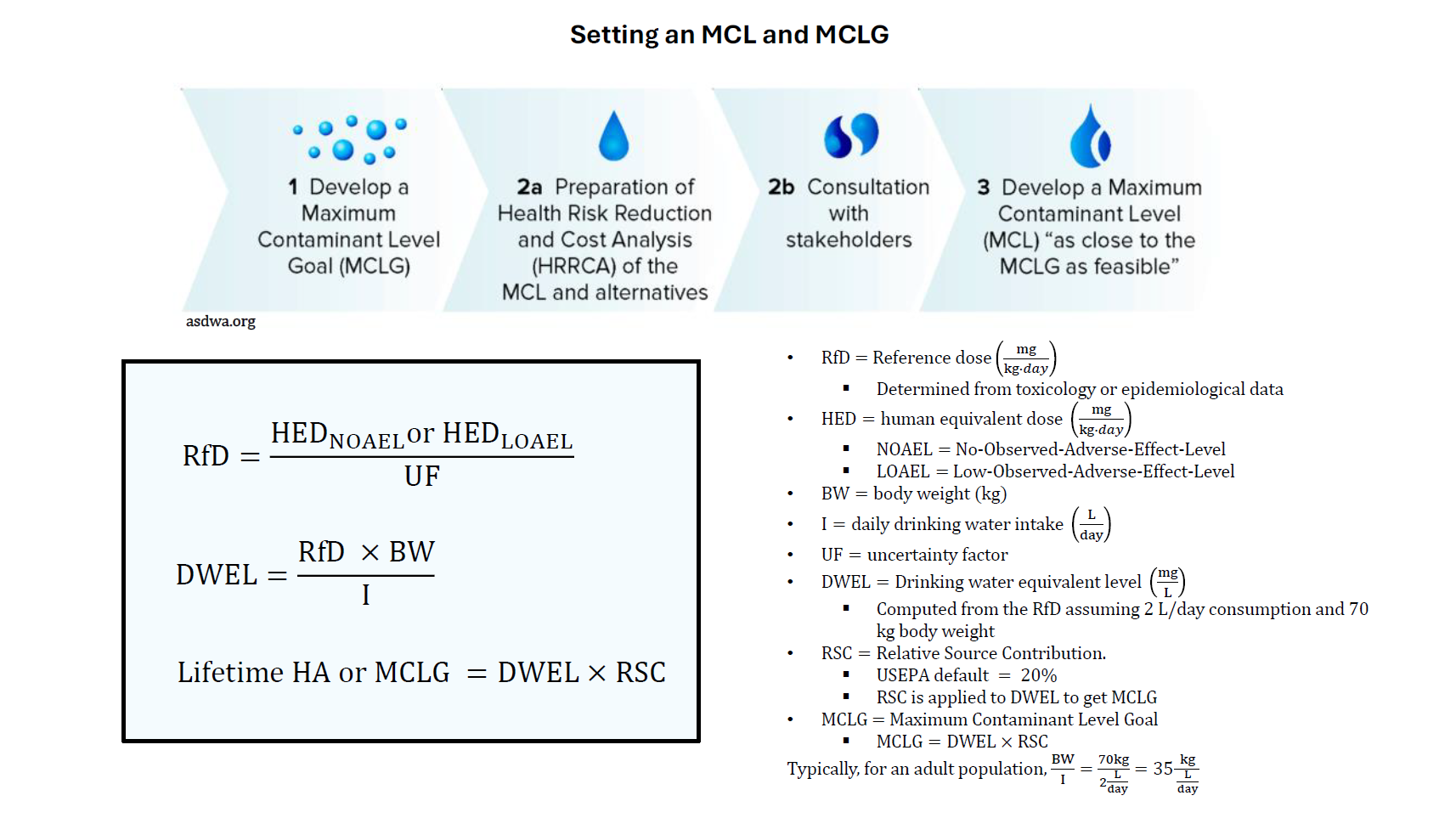
For each contaminant EPA first sets the MCLG, the level with no known or expected health risk, with a margin of safety. It starts from a reference dose (RfD) derived from toxicology or epidemiology studies, much of it assessed in EPA's Integrated Risk Information System (IRIS). EPA's CompTox Chemicals Dashboard gathers toxicity values (including IRIS values), exposure and property data for each chemical in one place, which helps when looking up an RfD or cancer slope factor. The RfD becomes a drinking water equivalent level (DWEL) for a 70 kg adult drinking 2 L a day, and the share of exposure allowed from drinking water (the relative source contribution, 20% by default) gives the MCLG. For carcinogens the MCLG is zero. The enforceable MCL is then set as close to the MCLG as feasible, considering treatment technology, cost and benefits (the Health Risk Reduction and Cost Analysis).
Worked examples of these calculations (RfD, DWEL, MCLG and MCL) with further explanations are in the Drinking-Water-Database repository on GitHub.
EPA regions
The Region filter and map use EPA's ten regions.
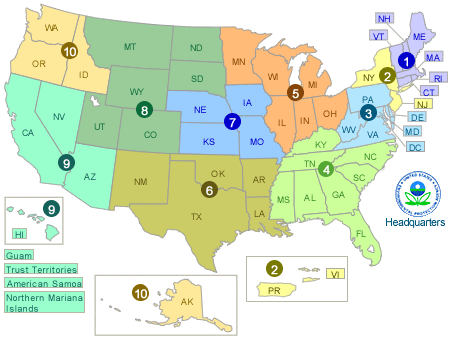
More references
- Drinking-Water-Database (GitHub): worked examples of calculating an MCL and other explanations, by Natchaya Luangphairin
- National Primary Drinking Water Regulations (limits, health effects, sources)
- Safe Drinking Water Act
- IRIS toxicity assessments
- CompTox Chemicals Dashboard: toxicity values (RfD, cancer slope factor), hazard and exposure data by chemical, useful for calculating an MCLG or MCL and for RHI parameters
- Drinking water health advisories
Health guidelines over time
The same contaminant can have very different drinking water values depending on who sets them and when. Agencies start from different toxicology studies and critical effects, uncertainty factors, exposure assumptions (adult or infant, share of exposure from water) and, for enforceable standards, what can be measured and treated. This tab plots the values over time so they can be compared, with the basis and source of each.
How to use this tab
- Choose a contaminant, or type any contaminant's name, SDWIS code or CAS number in Find any contaminant (suggestions appear; not case sensitive) and press Assemble values. The tool gathers what it holds for it: the cited values below, EPA's current MCL and MCLG, the drinking water values in EPA's ToxValDB, and values calculated from each toxicity value (RfD, ATSDR MRL, slope factor) with the equations below. It cannot read agency websites directly, so values only in documents need to be added by hand.
- Choose who sets the values (U.S. federal, U.S. states, international) and which kinds: enforceable standards (MCLs), health goals (MCLGs, California public health goals) and advisories and guidance (EPA health advisories, WHO guideline values, state notification levels).
- Read the chart: each point is labeled by organization and type (e.g. EPA MCL, WHO guideline); filled points are established and current, open points were later replaced by the same organization, grey points are proposed or draft, and diamonds are calculated from toxicity values. The dashed line marks the current EPA MCL. Hover a point for its basis and source; the table lists every value with a link to its source.
- Add a value (below the table) for another organization, contaminant or year, with its source; it is saved in this browser.
How health advisories and MCLGs are calculated
- POD
- point of departure from the key study: NOAEL, LOAEL or benchmark dose (mg/kg-day)
- UF
- uncertainty factors (animal to human, variability among people, study gaps)
- RfD
- oral reference dose (mg/kg-day)
- BW
- body weight (EPA adult default 80 kg; older documents 70 kg)
- DWI
- drinking water intake (adult 2.5 L/day; older 2 L/day; higher per kg for infants and lactating women)
- DWEL
- drinking water equivalent level: water concentration matching the RfD (mg/L)
- RSC
- relative source contribution: share of exposure allotted to water (20% to 80%; 20% default)
- CSF
- oral cancer slope factor (per mg/kg-day)
- Risk
- lifetime cancer risk level (often 1 in a million, 10-6)
The MCL is then set as close to the MCLG as is feasible with the best available treatment and measurement, taking costs into account (for carcinogens, at the practical quantitation level, e.g. 4.0 ng/L for PFOA and PFOS). Organizations reach different values mainly by choosing different key studies and critical effects (POD), uncertainty factors, exposed groups (BW, DWI) and RSC. The diamonds on the chart use these equations with each RfD, MRL or slope factor in EPA's ToxValDB and the assumptions below.
Lifetime HA from your RfD: — · Concentration at the risk level from your CSF: —
Values and sources
Add a value
Add a value from another organization, year or contaminant, for example an ATSDR comparison value you derived, a state standard or a value from a paper. A source is required so the value can be checked. Values you add are saved in this browser only and are marked in the table.
Everything on this page is answered by DuckDB, an analytical SQL database, running inside your browser through DuckDB-WASM. The EPA data arrive as one compressed DuckDB file (wqx.duckdb.gz), attached read-only as wqx; the app adds views and any files you upload in memory. Browse the tables below or write your own SQL. Queries run on your computer and cannot change the data.
Tables and views
SQL console
What the Water Quality Explorer is
A free, open tool that brings EPA's national drinking water data together in one place and analyzes it in your browser: compliance violations since 1976 for every public water system, the inventory of systems and their treatment, Six Year Review compliance monitoring (1998–2019) and Unregulated Contaminant Monitoring Rule results (2000–2026), alongside drinking water standards and the regulatory history behind them.
What makes it different
- Everything joined on the water system (PWSID), so violations, sample results, treatment and system characteristics can be filtered and compared the same way.
- Analysis built in, not just data: intervention analysis (pre/post, interrupted time series, difference-in-differences), correlation, the relative health indicator (RHI), which puts different contaminants on one health scale, and social vulnerability analysis linking water systems to the communities they serve.
- No server and no account: queries run on your computer with DuckDB, so your own uploads never leave your browser.
- Reproducible and shareable: every table and chart downloads as CSV or PNG, the Database tab shows the SQL, and the Report tab builds a branded report you can print to PDF.
- Updated monthly from EPA, with units standardized per contaminant and always shown.
Two kinds of data
Occurrence data (UCMR 1–5 and the Six Year Review) are sample results for every system monitored, including non-detects, so they show how often and at what levels a contaminant occurs. Violation data (SDWIS) count the utilities that violated a standard (and their violations) and carry the measurement reported with each violation, but they say nothing about systems that did not violate. Use occurrence data for exposure, RHI across all systems and community comparisons of levels; use violation data for compliance.
Use cases
- Water utilities
- Compare your system with similar systems (same size, source water and state) on violations and measured levels; load your own monitoring results to calculate the relative health indicator (RHI) and see which contaminant contributes most to the relative health risk of your water; build a branded report with your logo for your board or customers.
- State drinking water programs and regulators
- Track compliance by county, system size or source water; test whether a rule changed outcomes (for example arsenic violations and measured levels before and after the 2006 MCL, with interrupted time series or difference-in-differences); estimate the population-RHI gained if every system met a threshold; find which communities carry the most risk to target funding and technical assistance.
- Researchers and students
- Analyze decades of national violation, Six Year Review and UCMR data without downloading or cleaning files; run correlations between contaminants (for example arsenic and uranium in groundwater systems); fit multilevel models for samples nested in systems, counties and states, or for county RHI against sociodemographics with states as groups; combine RHI with Census or CDC/ATSDR SVI data to study environmental justice questions, as in Black, Luangphairin and Alfredo (2025); export every table and the SQL behind it for your own work.
- Public health and environmental justice groups
- See whether communities with more poverty or racial and ethnic minority residents have higher odds of contaminant detections or higher relative health risk, by county or ZIP code area, and map the results.
- Consultants and engineers
- Screen occurrence across systems for treatment planning (for example how many systems exceed a level in a region), look up MCLs in consistent units, and check which treatment processes systems report.
- Educators
- Teach the Safe Drinking Water Act with the regulation timeline, how MCLs are set and real data; let students explore regulations, run intervention analyses and write reports in class, in any browser and with no software to install.
- Journalists and the public
- Look up a water system's violation history and treatment, see how a state or contaminant compares nationally, and share the tool with the Share button.
Example walk-through (or press the demo buttons): choose SYR 2–4 combined and Arsenic, Group by State, and press Update results to see two decades of arsenic levels; in Intervention, set 2006-01-23 and run a pre/post analysis; in RHI metrics, calculate the relative health indicator for arsenic and uranium; in Social vulnerability, load Census data by ZIP code area and compare communities; then build a report with the sections you want.
Quick start
New here? Press ▶ Try a demo in the sidebar, or ▶ Run the demo in the Intervention, Correlation, RHI metrics or Social vulnerability tab: each sets up an example (for example the Arsenic Demo Sites before and after the 2006 arsenic MCL) and runs it. To set things up yourself:
- Choose a dataset in the sidebar (step 1): SDWIS violations, a UCMR round, a Six Year Review round, or a combined set (all UCMR or all Six Year Review rounds) for the longest record. A newer round that is not listed yet (for example a new UCMR release) can be uploaded under "Add SYR, UCMR or other occurrence data"; once it is added to the site it also joins the combined set.
- Pick contaminants (step 2). None is selected at first (that means all of them); type to search and tick as many as you like; the list stays open.
- Set time and aggregation (step 3): dates, year, quarter or month, how to group (national, state, system size…) and the statistic (violation counts, measured values, detection frequency…).
- Filter (step 4) by state, region, system type and size, source water, owner, treatment, or specific water systems: search or paste PWSIDs, or use a preset such as Arsenic Demo Sites (50 systems).
- Press Update results. Explore shows the chart and table; the other tabs use the same selection.
Six Year Review contaminants download the first time you use them and stay loaded while the page is open, so later updates only filter. Pick contaminants first: downloading a whole round is large. In general, choose contaminants and filters before pressing Update results; if something takes more than a few seconds, a "Still working" note explains that large selections load once and then stay loaded.
The tabs
- Multilevel model
- For nested data (samples within water systems within counties within states): how much of the variation lies at each level (ICC), whether each level is needed (likelihood-ratio tests, AIC, BIC), and the predictors' effects once the grouping is accounted for, next to regular regression. Use this tool's results for one contaminant, the Social vulnerability tab's results (counties within states with Census/SVI predictors, as in Black, Luangphairin and Alfredo 2025), or your own table with any columns as grouping levels. Shows the model equations, a "things to check" scorecard (ICC, LRT, AIC/BIC, R², RMSE, p-values, VIF, residuals), group effects and residual plots; predictors are added one at a time or chosen by BIC/AIC. Two demos with simulated data.
- Machine learning
- Upload your own data (template provided), choose an outcome such as a plant's influent PFAS and the parameters that might predict it (river level, rainfall, pH, alkalinity, hardness, TOC, ASR blend), and compare a decision tree, a random forest and gradient boosting (XGBoost-style) on held-out rows: which predictors matter, the tree itself, predicted vs observed and how the outcome changes with each top predictor. Runs in your browser; the demo uses simulated data.
- Health guidelines
- Compare drinking water values for a contaminant over time: EPA MCLs, MCLGs and health advisories, state standards and guidance, WHO, Health Canada and the EU, each labeled by organization with its basis (toxicology study, critical effect) and source. Filter by who sets the value and its kind; add your own values with their source. Find any contaminant assembles everything the tool holds for a contaminant (EPA's MCL and MCLG, ToxValDB drinking water values, and values calculated from each RfD and slope factor, shown as diamonds), and the equations show how health advisories and MCLGs are calculated, with a calculator. Run the demo shows PFOA. The chart, key findings and the values with sources can go into the report (section Health guidelines).
- Explore
- Line, bar, stacked, box, heatmap or map charts of the selection over time. Hover for values and units. Grouped by Water system, results keep the 2,000 systems with the largest totals or highest averages (narrow by state or PWSID to see others). On the map, group by State to shade states or by Water system to show a dot per system (sized by population; click a dot to open the system). Hover a state or dot for a detail card: its rank and each contaminant's value with a trend line (with details when up to three contaminants are selected). Download CSV saves the aggregated table; Download filtered records saves every violation or sample behind it with all its columns and every water system inventory column (press Reset first to download a whole dataset), and Column descriptions explains each column. The map needs Group by: State.
- Summary table
- A pivot table: choose rows, columns, a measure and how to show it (values, % of row, % of total), as bars, stacked bars, pies or a heatmap.
- Water systems
- Every system matching the filters with its characteristics, treatment by facility and violation history. Select a system for its detail page. Show map places the systems on a US map (at a county they serve, or their mailing ZIP code); click a dot for that system's details.
- Intervention
- Did something change after a date (for example a new MCL)? Compare before and after, fit an interrupted time series, or compare treated and control groups with difference-in-differences. Analyze measured values (each water system's mean, median, 95th percentile, maximum or minimum per period, then averaged across systems) or the number of systems in violation or with a detection. For difference-in-differences, set a control group of specific water systems (paste PWSIDs or choose control-only filters); without one, the interrupted time series' projected pre-intervention trend is the counterfactual. When the PWSID filter is used (for example the Arsenic Demo Sites), a map shows the systems analyzed.
- Correlation
- Do two or more parameters rise and fall together? Choose contaminants (or population served) per water system, state, region or period, or load any table of your own, and pick Pearson, Spearman or Kendall.
- RHI metrics
- Relative health indicator for each contaminant and water system: the RHI of a glass of water, population-RHI, how much would be gained if every system met a threshold, subregion results and "cups of water" graphics, including a large glass beside the key findings with one colored layer per contaminant (its share of the total). RHI is a relative index: its values only mean something compared with each other. Edit or add toxicity parameters, or upload your utility's own results.
- Social vulnerability
- Which communities are most exposed? Load sociodemographic data by county or ZIP code area (both work right away, placing systems by their inventory ZIP code until EPA's areas-served records arrive), either from the Census Bureau (paste your free API key; about 30 indicators of population, age, race and ethnicity, income, poverty, education, language and housing) or a CDC/ATSDR Social Vulnerability Index file, then compare communities: odds of a detection, Wilcoxon tests, correlations, a regression adjusted for state, a county map and a CSV.
- Report
- Builds a report from your latest results: a section has results only after you run that analysis in its tab. Each section shows Ready or Not run yet with a Go to button to run it. Tick the sections to include, reorder them with the arrows, add a title, notes, your organization and logo, and optionally choose the font, text size, line spacing, heading color and paper size under Report style; then download HTML or print to PDF.
- Regulations
- Look up any contaminant's MCL, MCLG or treatment technique (with the MCL in this tool's units), the Safe Drinking Water Act regulation timeline, and how standards are set.
- Code reference
- Every SDWA code (contaminants, rules, violation types) with how often it appears in the data.
- Database
- Browse the tables and run your own read-only SQL; examples fill in the contaminant you selected.
- Data & methods
- Sources, the data pipeline, statistical methods, caveats, license and citation.
Running an analysis, step by step
Each analysis tab starts with a "How to run this analysis" box with these steps.
Intervention: (1) in the sidebar choose dataset, contaminant(s), a date range covering before and after, time level, statistic and Group by (groups such as State for difference-in-differences), then Update results; (2) set the intervention date; (3) choose pre/post or difference-in-differences (and the treatment group); (4) optionally the period summary, confidence level and transition period; (5) Run analysis.
Correlation: (1) choose this tool's data (set the sidebar first) or your own table; (2) for tool data, what each observation is (water system, state, region or period); (3) pick 2 to 8 parameters; (4) choose Spearman, Pearson or Kendall; (5) Run correlation.
RHI metrics: (1) choose this tool's data (a Six Year Review or UCMR dataset covers every sampled system) or your own results with matched columns; (2) set exposure per system and non-detects; (3) choose contaminants; to add parameters, type a name, SDWIS code or CAS number in Find a contaminant (suggestions appear; not case sensitive) and press Add and look up, which fills the code, name, unit and EPA threshold; any row's Look up values lists the oral RfD, ATSDR MRL and cancer slope factor values from EPA's CompTox Chemicals Dashboard (IRIS and other assessments) with their sources, and Use fills one in and keeps its citation for the report (add the UF, severity and threshold yourself); (4) choose the subregion; (5) Calculate RHI. The figures list contaminants from highest to lowest; change that with Sort contaminants in the figures above them.
Multilevel model: (1) choose the data: this tool's results for one contaminant (set the sidebar first), the Social vulnerability tab's results (run it first), or your own CSV (template); (2) log10 outcome, centering (grand mean, within cluster or none) and how predictors are added (in order, or forward selection by BIC or AIC); (3) the grouping levels from lowest to highest (with your own table, any columns; the check under the menus counts groups and tests nesting) and the predictors; (4) Fit models, then read the scorecard, the null-model ICCs, the model comparison and the fixed effects.
Social vulnerability: (1) load sociodemographic data: geography (ZIP code areas or counties) and the Census API (key, year, Download) or a CDC SVI file; (2) set the sidebar's dataset, dates, filters and statistic, or run RHI first for cumulative RHI; (3) choose contaminants, the two groups and thresholds, predictors and the state adjustment; (4) Run analysis. Only currently active systems are linked unless you set the sidebar's "Current activity status" filter, so include inactive systems there when analyzing older data.
Make it yours
- Logo and organization: in the Report tab, choose a logo file (PNG, JPG, SVG or WebP) and type your organization's name; they appear at the top of every report. "Use example logo" brings back the default.
- Chart colors: in the sidebar, tick custom colors and pick eight colors or paste a list of hex codes (for example your brand palette). Every chart, map and report figure uses them.
- Both are saved in your browser only, so they are there next time on the same computer.
Use your own data
- Monitoring results: open "Add SYR, UCMR or other occurrence data" in the sidebar and add CSV or tab-delimited files. Columns for PWSID, sample date, contaminant and result are needed (the list of accepted names and a template are there). Your data then works in every tab.
- Any table (for example lab results without PWSIDs) can be correlated in the Correlation tab with no column naming.
- Utility results for RHI: in RHI metrics choose "My own results", load the file and match the columns (site, contaminant, concentration, unit, population, subregion).
Census and SVI data in R
For your own analyses, the R packages tidycensus and findSVI download Census and SVI data for several years at the national, state, county or ZCTA level (a free Census API key is needed); see Kyle Walker's free book Analyzing US Census Data: Methods, Maps, and Models in R. A table they produce, with a FIPS or ZCTA column, can be loaded in the Social vulnerability tab. Other useful EPA resources: EnviroAtlas (land use and other geographic layers) and the PFAS Analytic Tools.
Templates (made-up example values; keep the header and replace the rows): monitoring results (sidebar upload), any table (Correlation), utility results (RHI metrics), sociodemographic table (Social vulnerability), nested results (Multilevel model), river and plant data (Machine learning). The demos' simulated datasets (not real data): wells in counties in states, county RHI and sociodemographics, river data and influent PFAS.
Tips
- Units are standardized per contaminant (for example arsenic in µg/L, nitrate in mg/L); contaminants with different units are never combined.
- Violation counts can count each system once per period ("Count each = PWSID") or every violation.
- If the page seems stuck, check the status at the top right; large downloads show their progress there.
- When you switch datasets, the contaminants you chose stay selected if the new dataset has them.
- Above every chart and analysis, a Selection line reminds you of the dataset, contaminants, years and filters behind it.
- Ideas or problems? Use the Feedback button: it goes straight to the author. To pass the tool on, use Share.
Please cite: Luangphairin, N., & Alfredo, K. (2026). Water Quality Explorer [Web application]. https://natchayal.github.io/water-quality-explorer/
About the author

Natchaya "Jade" Luangphairin is a Ph.D. candidate in Civil & Environmental Engineering at the University of South Florida, working on drinking water treatment, PFAS and emerging contaminants, EPA regulatory data analysis and data-driven tools for safer water. The Water Quality Explorer grew out of that work. More about Jade's research, publications and projects: Jade's Field Notes.
How it is built
Once a month an automated job (GitHub Actions) downloads the latest EPA files (the water system inventory with the counties and ZIP codes each system serves, violations, treatment and reference codes), appends new and updated violations, rebuilds a single DuckDB database and republishes the site. It also checks the Federal Register for new EPA drinking water rules and opens an issue so the hand-kept standards and guideline tables can be updated (values themselves are changed only by hand, from the rule). The same job looks up each contaminant's toxicity values (oral RfD, ATSDR chronic MRL, cancer slope factor) through EPA's CompTox CTX API and saves them with their sources for the RHI tab. UCMR and Six Year Review data are not part of this monthly update. UCMR 1–5 (separate DuckDB files on the same site) and Six Year Review 2–4 (kept in a public Hugging Face dataset because they are much larger) were converted once and are ready to use, each round on its own or combined (UCMR 1–5 combined, SYR 2–4 combined). A round that is not here yet, such as a new UCMR release or Six Year Review round, or SYR 1, has to be added: the maintainer converts it once and rebuilds, which lists it in the Dataset menu and adds it to the combined sets; until then you can upload EPA's files yourself under "Add SYR, UCMR or other occurrence data" (they are analyzed as their own dataset, not merged into the combined sets). Your browser does the rest: it downloads the database (and any UCMR or Six Year Review data you select), adds any files or Census and CDC/ATSDR SVI data you load, queries everything with DuckDB-WASM, runs the statistics and the relative health indicator, and draws the charts and maps, so there is no server.
Tools
- DuckDB (Node.js client
@duckdb/node-api): builds the database from the EPA source files (water-quality-explorer/build/build_web_data.mjs;prepare_sources.mjsandupdate_sources.mjsrefresh the sources; all in this site's repository): deduplicates violations, standardizes measures and units, summarizes treatment and keeps the reference codes. - DuckDB-WASM 1.32: runs SQL in the browser for every filter, join (on PWSID), aggregation, summary table, export and the Database console.
- stats.js: the app's own JavaScript port of the R statistics module (t distribution, Welch t-test, Wilcoxon rank-sum with Hodges–Lehmann, bootstrap and permutation tests, OLS with Newey–West and cluster-robust standard errors), plus Pearson, Spearman and Kendall correlation, Holm adjustment, odds ratios and regression tables. No external statistics library.
- rhi.js and cups.js: the relative health indicator equations (Alfredo et al. 2017) and the "cup of water" graphics.
- Census Bureau API (American Community Survey 5-year estimates, called from your browser with your own key) and CDC/ATSDR Social Vulnerability Index tables you load: sociodemographic data for the Social vulnerability tab.
- Map data, hosted with the site: US county outlines (us-atlas, ISC licence), ZIP code centers (zipcodes package, BSD licence) and a ZIP code → county lookup derived from them.
- EPA CompTox CTX APIs (Computational Toxicology and Exposure APIs): the monthly update looks up each contaminant in the CompTox Chemicals Dashboard and saves its oral reference doses, ATSDR chronic MRLs and cancer slope factors from the Toxicity Value Database (ToxValDB, which includes IRIS), with sources, for the RHI tab's Look up values. The API key is kept as a GitHub secret and is never sent to your browser.
- Web3Forms: sends the Feedback form to the author by email.
- Plotly.js 2.35: interactive charts, the state map (outlines from Plotly's topojson), county maps and water system location maps.
- GitHub Pages: hosts the static site and data files; GitHub Actions runs the monthly update (
.github/workflows/update-water-data.yml): it refreshes the sources, rebuilds the database and commits only when the data changed. - Hugging Face Datasets: hosts the Six Year Review 2–4 files (natchayal/water-quality-explorer-data), which together exceed GitHub Pages' 1 GB site limit.
prepare_sources.mjs --syrconverts EPA's Access databases (SYR 2, read withmdb-reader) and text files (SYR 3–4) to one gzipped CSV per analyte in one standard set of columns, andupload_to_huggingface.mjs(@huggingface/hub) uploads them. The browser downloads an analyte straight from Hugging Face the first time a query needs it. - R Shiny reference: the original WaterQualityExplorer app (tidyverse, plotly, sandwich, lmtest), whose analysis module these methods follow.
- Developed with assistance from Claude Code (Anthropic).
License and citation
© 2026 Natchaya Luangphairin. The Water Quality Explorer is licensed under Creative Commons Attribution-NonCommercial 4.0 (CC BY-NC 4.0): you may share and adapt it for teaching, research and other non-commercial purposes, with credit and a link to the license. For commercial use, please contact the author. The EPA data it uses are public; the tool is independently developed and not affiliated with the EPA.
Please cite it as:
Luangphairin, N., & Alfredo, K. (2026). Water Quality Explorer [Web application]. https://natchayal.github.io/water-quality-explorer/
Data
Occurrence versus violation data. Only UCMR and the Six Year Review are occurrence data (results for every system monitored, including non-detects). SDWIS violations identify the utilities that violated and the measurement reported with each violation; they do not describe systems without violations.
- SDWIS violations: EPA Envirofacts VIOLATION table, one row per violation (the raw file repeats a violation once per enforcement action). Dated by the start of the compliance period.
- Water system inventory: ECHO SDWA public water systems download (every system, active or not), joined on PWSID to every dataset so the same filters work everywhere. Personal contact fields (administrator and organization names, email, phone, street address) are not included. System characteristics are the current values, not the values at the time of each record.
- Treatment: Envirofacts treatment table, one row per treatment process at each facility (objective, process and comments), shown by facility in the Water systems tab and summarised per system for the treatment filters.
- Reference codes: ECHO
SDWA_REF_CODE_VALUES(2,354 codes in 55 code types), used for every label in the app and searchable in the Code reference tab. - UCMR 1–5: EPA's Unregulated Contaminant Monitoring Rule results for every release, ready to select from the Dataset menu (each downloads the first time it is chosen). Units are standardized per contaminant, for example every UCMR 5 PFAS in ng/L.
- Six Year Review 2–4: EPA's compliance monitoring results (about 1998–2019), one file per analyte in one standard set of columns, in the Dataset menu; each analyte downloads the first time it is used. Because they are too large for this site's host, these files are stored in a public Hugging Face dataset.
- Areas served: ECHO
SDWA_GEOGRAPHIC_AREAS, the counties, ZIP codes and cities each system reports serving, linked to 5-digit county FIPS codes in the build; used by the Social vulnerability tab and the maps. Until it is in the build, systems are placed by the ZIP code in their inventory record. - Census and SVI: ACS 5-year estimates from the Census Bureau API or CDC/ATSDR SVI tables, loaded by you; not stored on this site.
- Health guidelines: a curated table of guideline values over time (EPA, states, WHO, Health Canada, EU) for PFOA, PFOS, HFPO-DA, PFBS and arsenic, compiled from the Federal Register, EPA, state and international documents listed with each value (as of October 2026); values not re-checked against the primary document are marked "check source".
- Drinking water standards: EPA's National Primary Drinking Water Regulations and EPA's 2015 regulation timeline (Regulations tab); RHI toxicity values from Alfredo et al. (2017), Tables 1–2, and current values from EPA's CompTox Chemicals Dashboard (ToxValDB: IRIS, PPRTV, EPA Office of Water, ATSDR and other assessments), each cited with its source and year when used.
- Other Six Year Review rounds and newer UCMR releases: not on this site until they are added. You can upload EPA's files under "Add SYR, UCMR or other occurrence data"; they are analyzed as their own dataset. When the maintainer adds a round to the build (see build/README.md), it appears in the Dataset menu and the combined UCMR or Six Year Review set includes it. Columns are matched by name, so other occurrence files with a PWSID, sample date, contaminant and result column also work.
Statistics per period
- Violation count, counting each PWSID: the number of unique PWSIDs with at least one violation that started in the period (a system counts once per year, quarter or month however many violations it had), summed over the systems in each group. Counting each violation counts every unique violation instead. % of systems in violation divides by the number of systems in the group that were active then (first reported on or before the period end and not deactivated before it began).
- Violation measure: for each PWSID in each period (or table cell), the 95th percentile of its standardized violation measures; the plotted value is the mean of those system values, and tables also give the number of systems, median, minimum, maximum and 95% confidence interval of the mean.
- Units: every contaminant has one standard unit (for example arsenic, lead, TTHM and HAA5 in µg/L; nitrate, fluoride and copper in mg/L; others chosen from their typical values). mg/L, µg/L and ng/L values are converted; measures with no unit, a unit that cannot be converted, a value of zero, or a value more than 100 times from the contaminant's median after conversion (a likely unit error) are left out of measure statistics, and the system details show why. Uploaded SYR and UCMR results are converted the same way. Contaminants with different units are never combined.
- Concentration statistics (mean, median, 90th percentile, maximum) use the non-detect rule you choose. Detection frequency is the share of samples above the reporting level.
- For counts and rates, a group with no violations in a period counts as zero.
Machine learning
The Machine learning tab fits three tree models to the viewer's own table, written for this tool in JavaScript and run in a background worker. All share one tree builder that cuts each predictor at up to 32 quantiles of the training data and chooses splits by the XGBoost gain on gradients and hessians. The decision tree is CART on squared error (for a yes/no outcome, the Gini criterion); the random forest averages trees grown on bootstrap samples with a random subset of predictors at each split; gradient boosting adds shallow trees one at a time to the gradient of squared-error or logistic loss, with L2-regularized leaf weights, a learning rate and 80% row subsampling. Missing predictor values are filled with the training median; text predictors become one yes/no column per category. Models are compared on 25% of rows held out (the latest by date, or a seeded random draw) by R², RMSE and MAE, or accuracy, sensitivity, specificity and AUC. Predictor importance is permutation importance (the drop in held-out R² or AUC when a predictor is shuffled, five times), alongside each model's share of split gain; partial dependence shows the average prediction as one predictor varies.
Multilevel model
The Multilevel model tab fits linear mixed models with nested random intercepts, y = γ₀ + Σ βₚxₚ + u(level 1) + u(level 2) + … + e, with each level's intercepts and the residual normally distributed (variances τ² and σ²), by maximum likelihood (as nlme::lme(..., method = "ML") or lme4::lmer(..., REML = FALSE) in R, so models with different predictors can be compared). Written for this tool in JavaScript and run in a background worker: the likelihood is computed from each lowest-level group's sums, with the inverse covariance built level by level (Sherman–Morrison), the residual variance profiled out and the variance ratios found by Nelder–Mead on the log scale; group effects are the best linear unbiased predictions. Checked against the closed-form one-way solution and on simulated three-level data with known variances. The steps follow the usual approach (centering decision, null model, intermediate models, final model, interpretation): regular regression; the null model with one grouping level added at a time (ICC = τ² of a level ÷ (all τ² + σ²), with the 95% range of group means γ₀ ± 1.96τ); the predictors added one at a time in the viewer's order, or by forward selection on BIC or AIC (each step adds the predictor that lowers it most; the model with every predictor is also fitted, as model 1 and model 2 in Black, Luangphairin and Alfredo 2025); and regular regression with the final predictors for comparison. Likelihood-ratio tests compare each model with the previous one; for an added variance the p-value is half the χ²(1) tail because the variance cannot be negative. R² follows Nakagawa and Schielzeth (2013): marginal = variance of the fixed part ÷ total, conditional = (fixed part + all τ²) ÷ total. RMSE uses fitted values with the group effects (and without, for the fixed part alone). VIF = 1 / (1 − R²) of each predictor regressed on the others. Wald 95% CIs and p-values use the normal distribution. Categorical predictors are compared with their most common category; numeric predictors are grand-mean centered by default, or split into the lowest group's mean and the difference from it (within-cluster centering). Residual plots use the final model's fitted values, standardized for the Q-Q plot. Random slopes and cross-level interactions are not fitted. With this tool's data, up to the chosen number of water systems are sampled at random (seeded) and counties come from the areas each system serves. The Social vulnerability source uses each community's population-weighted value (Black et al. 2025, Eqs. 5–6).
Survival analysis
The Intervention tab's survival analysis (Analysis: Time to first event, or Both with the pre/post or difference-in-differences results on the same page) follows each water system from the start date (the intervention date) to its first event, to the sidebar's end date. With violation data every system matching the filters and active on the start date is followed, so systems that never violated are included and censored at the end (or when they closed); with Six Year Review or UCMR data every sampled system is followed to its first result above the threshold (the EPA MCL by default) or its first detection, censored at its last sample. Survival curves are Kaplan–Meier estimates with Greenwood confidence intervals on the log(−log) scale; the median time and its limits are where the curve and its bounds reach 50%. Groups are compared with the log-rank test and a Cox proportional hazards model (one categorical covariate, Breslow ties, Wald confidence intervals and p-values, likelihood-ratio test), with the largest group (or the control systems) as the reference.
Intervention analysis
- What is analyzed: for measured values, each water system's mean, median, 95th percentile, maximum or minimum of its values in each period (year, quarter or month; violation measurements for SDWIS, sample results for UCMR and the Six Year Review), then the average of those system values in each group and period; for counts, the number of unique water systems in violation (or with a detection) in each group and period. These group-period values are the observations below.
- Control group: either the other groups under the sidebar's Group by, or a set of water systems (pasted PWSIDs and/or control-only filters), in which case the treatment group is the systems in the sidebar selection and each system is a unit. Without a control group, the interrupted time series' projected pre-intervention trend serves as the counterfactual.
- Pre/post: Welch t-test for the difference in means; Wilcoxon rank-sum test with the Hodges–Lehmann shift (normal approximation, tie and continuity corrected); bootstrap confidence interval (1,000 resamples) and permutation p-value (2,000 permutations) for the difference in medians. Large inputs use fewer resamples.
- Interrupted time series: segmented regression on the mean series,
y = b0 + b1·time + b2·post + b3·time_after, with Newey–West standard errors (Bartlett kernel, lag ⌊4(n/100)2/9⌋, no prewhitening). Needs at least 3 periods on each side. - Difference-in-differences: the 2×2 model
y = b0 + b1·treated + b2·post + b3·treated·postand a two-way fixed-effects model (group and period effects), both with standard errors clustered by group (HC1, matching R'ssandwich::vcovCL). The pre-trend test fitsy ~ time × treatedon pre-intervention data. - The statistics are a JavaScript port of the R module in WaterQualityExplorer. They follow the same formulas as R's
t.test,wilcox.test(p-value),lmandvcovCL. Two differ slightly by design: the Hodges–Lehmann interval uses order statistics of the pairwise differences rather than R's root-finding, and Newey–West uses a fixed lag rule wheresandwich::NeweyWestpicks its lag automatically and prewhitens.
Correlation
The Correlation tab pairs parameters by unit of observation: each contaminant's value is the sidebar statistic per water system, state, EPA region or period over the selected dates (for water systems with "Count each = PWSID", the number of violations). For counts, every unit passing the filters is included and a unit with none counts as zero; for measured values, only units with values for both parameters of a pair are compared. Population served comes from the inventory. Viewers can also load any table and correlate its numeric columns. Pearson's r measures a straight-line relationship; Spearman's ρ (Pearson's r on ranks, ties averaged) and Kendall's τ-b (tie-corrected) measure monotonic relationships and resist outliers. Confidence intervals use Fisher's z with standard errors 1/√(n−3) (Pearson), √(1.06/(n−3)) (Spearman) and √(0.437/(n−4)) (Kendall) (Fieller, Hartley and Pearson 1957). p-values come from the t distribution with n−2 degrees of freedom (Pearson, Spearman) or the normal approximation with the tie-corrected variance (Kendall, as R's cor.test(exact = FALSE) without continuity correction); R uses exact p-values for small samples without ties, so very small samples can differ. With several pairs, p-values are also adjusted with Holm's method.
Relative health indicator (RHI)
The RHI metrics tab follows Alfredo, Seidel, Ghosh and Roberson (2017), Environmental Monitoring and Assessment 189:124. For each contaminant:
- j
- non-cancer or cancer
- exposure
- concentration in the water (mg/L, or pCi/L for radionuclides)
- I
- water ingested per day (default 2 L/day)
- BW
- body weight (default 70 kg)
- incidence
- non-cancer incidence (default 0.01)
- RfD
- oral reference dose (mg/kg-day)
- UF
- uncertainty factor of the RfD
- CSF
- oral cancer slope factor (per mg/kg-day)
- severity
- WHO disability weight of the critical effect (cancer: 0.29)
The defaults are I = 2 L/day, BW = 70 kg and incidence 0.01, with non-cancer severities from WHO disability weights matched to the IRIS critical effect (lowest default 0.01) and a cancer severity of 0.29. Exposure is each water system's 95th percentile result (non-detects at ¼ of the reporting limit) or, for violation data, the concentration reported with each violation summarized per system (Alfredo et al. 2017 used the mean). The violation data contain only utilities that violated, not occurrence data for every system as in the Six Year Review or UCMR, so RHI from violations describes violating systems only. Population-RHI weights each system's RHI by its share of the population served. Subregion values are population-weighted means of their systems' RHI (Eqs. 5–6 of Black, Luangphairin and Alfredo (2025), Environmental Monitoring and Assessment 197:323, which combined RHI with the CDC/ATSDR Social Vulnerability Index to study impacts on vulnerable populations). Published parameters cover arsenic, uranium, nitrate and combined radium (Alfredo et al. 2017, Tables 1–2); viewers can add others with values from IRIS, ATSDR or state assessments. RHI is linear in concentration (no threshold), additive across contaminants and relative: it compares contaminants and waters rather than predicting cases.
Social vulnerability
Water systems are linked to the counties and ZIP codes they serve from EPA's areas-served records (ECHO SDWA_GEOGRAPHIC_AREAS; county FIPS codes from EPA's county code or the county name). Where a system has no areas-served county or ZIP code (including before those records are in the build), it is placed by the ZIP code of its mailing address in the inventory (for counties, the county containing that ZIP code's center, found by point-in-polygon with the county outlines), which for some systems is an owner's office; the summary reports how many were placed that way, and ZCTA maps show dots at ZIP code centers. Sociodemographic data come from the American Community Survey 5-year estimates through the Census Bureau API (tables B01001, B01002, B01003, B03002, B15003, B19013, B19083, B19301, B22003, B23025, B25003, B25024, B25044, B25064, B25077, C16002 and C17002, the viewer's own key; percentages use each table's own universe) or a CDC/ATSDR Social Vulnerability Index table. Only currently active systems are linked unless the sidebar's "Current activity status" filter is set (choose inactive systems too for older data such as SYR 2). For counts (violations, samples, systems with a detection) a community's value is the total across the systems serving it; for concentrations, percentages and RHI it is the population-weighted mean of its systems' values (Black, Luangphairin and Alfredo 2025, Eqs. 5–6). A system serving several counties counts fully in each. Detection odds ratios use Woolf's confidence interval (0.5 added to every cell when one is zero); groups are compared with the Wilcoxon rank-sum test with the Hodges–Lehmann shift, associations with Spearman's ρ, and the regression is least squares with optional state fixed effects and standard errors clustered by state (the paper used multilevel models with states as groups).
Maps of water systems
The inventory has no coordinates, so systems are placed at the center of a county they serve (county outlines from the us-atlas package) or, failing that, at the center of their mailing ZIP code (from the zipcodes package), which can be an owner's office rather than the system itself.
Feedback
Ideas, problems or data you would like to see? Send feedback; it helps improve the tool.
Caveats
- The site's data are refreshed monthly by an automated job: the latest ECHO water system inventory and reference codes, new and updated violations and current treatment records from Envirofacts. The sidebar shows the date of the latest violation and of the last update.
- EPA updates SDWIS quarterly; recent periods may be incomplete, and some states under-report.
- A violation's measure (
viol_measure) is often missing; use counts and rates for violation trends. - Check units before comparing concentrations across datasets. The table shows the most common unit per contaminant.